 ORBIT, your AI partner
ORBIT answers your calls
Turn on ORBIT for your Tanero number, choose who answers first, and have callers put through to your verified mobile.
What you will do
Never miss a call: ORBIT answers, books, takes messages and puts callers through to you when they ask for you.
Before you start
- A paid plan. Your dedicated Tanero number is assigned automatically after your first paid invoice. It shows in the account menu at the bottom of the sidebar.
Steps
Turn ORBIT answering on
Open Real estate → Dialer, then the Settings tab. In Inbound calls, make sure ORBIT answers incoming calls is ticked.
When it is off, incoming calls are missed and appear in call history without ringing your browser or phone.
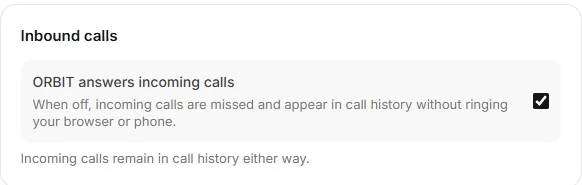
Dialer → Settings → Inbound calls. Set how ORBIT introduces itself
In the same tab, AI calling sets ORBIT's phone identity: Realtor name, Company name, Contact phone, Website, an optional Assistant name, Call language, Caller introduction (Realtor, Assistant or Company representative) and Voice (Female or Male). Press Save AI settings.
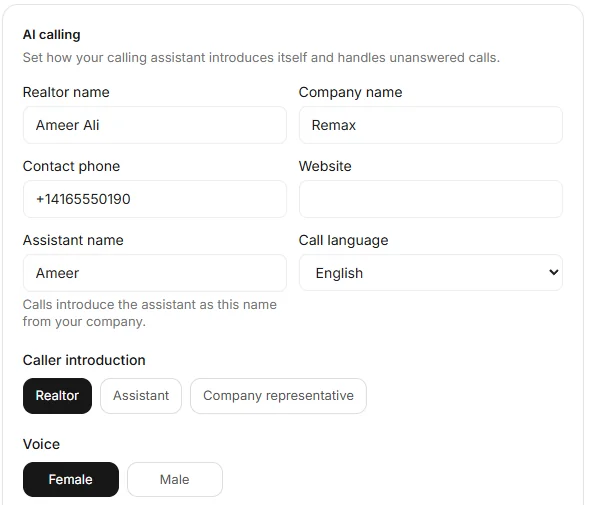
Dialer → Settings → AI calling. Add and verify your mobile
Open Agent tools & settings → Account → Who answers my calls. Type your number in My mobile number and press Send code.
Tanero texts a 6-digit code to your mobile from your Tanero number. Type it in Code from the text, press Verify, then Save. The badge changes to Verified.
The code works for 10 minutes. You can ask for a new code after a minute.
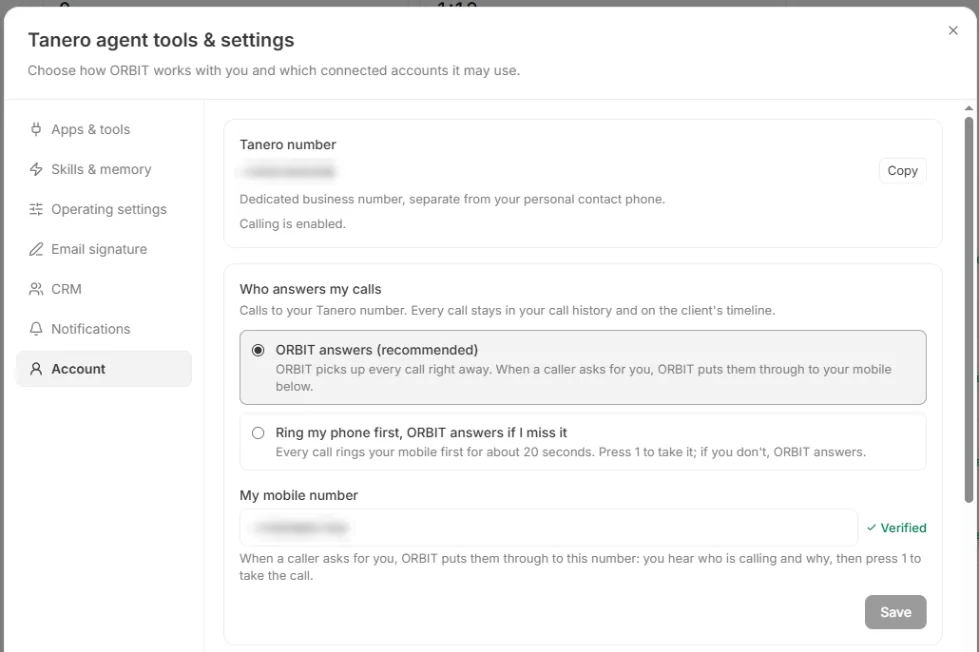
Agent tools & settings → Account. Numbers are blurred. Choose who answers first
ORBIT answers (recommended): ORBIT picks up every call right away. When a caller asks for you, ORBIT puts them through to your mobile.
Ring my phone first, ORBIT answers if I miss it: every call rings your mobile first for about 20 seconds. Press 1 to take it; if you don't, ORBIT answers. You can choose this once your mobile is verified.
When ORBIT puts a caller through
Your mobile rings and you hear who is calling and why. Press 1 to take the call. If you don't take it within about 20 seconds, the caller goes back to ORBIT, which takes a message and confirms their callback number.
After the call
ORBIT posts a plain-language summary in the Action Center and the bell tells you. The call, with its summary, transcript and recording, is in Call history and on the client's timeline. New callers are added to your CRM.

Dialer → Call history. The caller is blurred.
Say it to ORBIT
You can also just ask. For example:
- “Turn on call answering.”
- “Ring my phone first from now on.”
Tips
- ORBIT can book an appointment during the call, inside your work schedule. Set it in Calendar and booking rules.
- Once it is on, ORBIT answers at any hour. Your work schedule only limits when it books appointments.
Questions
Which languages can ORBIT speak on calls?
ORBIT's calls run on Google's voice AI, which speaks more than 100 languages. ORBIT starts in the Call language you set and switches to the caller's language once they speak a full sentence in it.
Does ORBIT tell callers it is an AI?
ORBIT introduces itself as your assistant, with the name you set. If a caller asks, it answers truthfully that it is an AI assistant.
Are calls recorded?
Yes. Answered calls are recorded, and you can play the recording in Call history.
Is there voicemail?
No. When ORBIT answering is on, ORBIT takes the call instead of voicemail.
Why was a caller not answered?
ORBIT answering may be off, your call minutes may have run out, or the caller is marked do not contact.
Why can't I choose Ring my phone first?
Verify your mobile number first. Changing the number later switches the mode back to ORBIT answers until the new number is verified.
Something not covered here? Ask ORBIT, or write to [email protected]. All guides