 ORBIT, your AI partner
Match listings to a client
Search live MLS® listings and find homes that fit a client's saved criteria with Instant Match.
What you will do
Find real, current listings for a client in seconds.
Steps
Open Instant Match
In the sidebar, open Real estate → Instant Match. It searches live MLS® listings.
Search by hand
Use Search manually with City or MLS®, Max price, Minimum beds, Property type and Transaction (Buy or Rent).
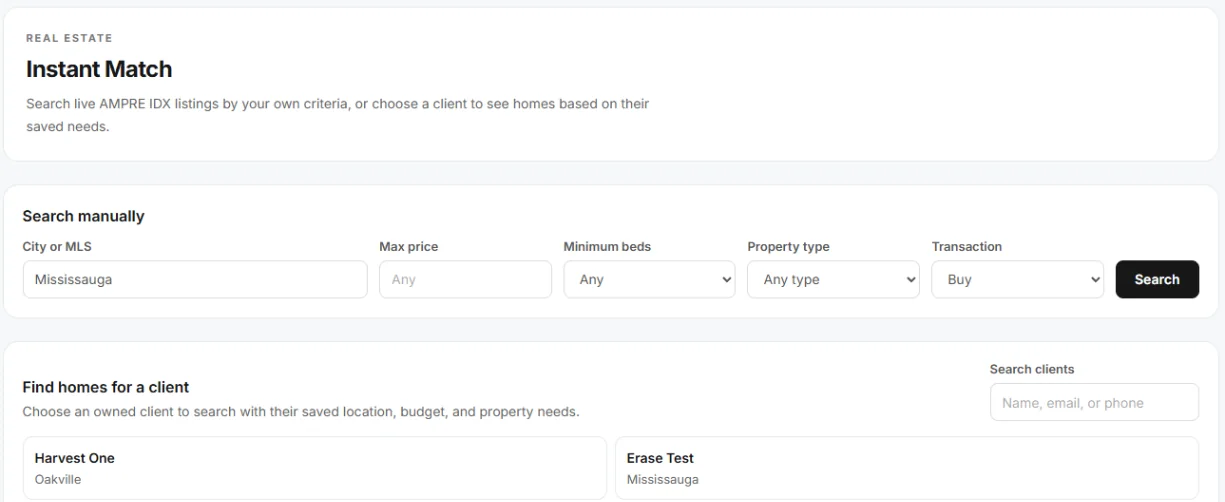
Instant Match. Find homes for a client
Use Find homes for a client, pick the client, and Tanero searches with their saved location, budget and needs.
Ask ORBIT
“Find detached homes in Oakville under $1.6M for the Patels.” ORBIT uses live listings and the client's saved criteria. If something is missing, such as a budget, ORBIT tells you what to add instead of guessing.
Tips
- Found the one? Ask ORBIT to make a property page for it.
Questions
It says live listings are not connected in this workspace yet.
Listing search is not switched on for your workspace yet. Write to [email protected].
Something not covered here? Ask ORBIT, or write to [email protected]. All guides