 ORBIT, your AI partner
Property pages with a unique link
ORBIT designs a landing page for a listing, with its own short link you can share, send or advertise, and redesigns it whenever you ask.
What you will do
Get a polished page for any listing in a minute, with one link for texts, emails, social posts and ads.
Steps
Ask ORBIT for a page
Give ORBIT the MLS® number or the address: “Make a property page for 24 Maple Crescent, Oakville.” ORBIT reads the listing from live MLS® data, or from the public listing on the web when needed, and designs the page.
Get the link
ORBIT replies with the page's short link, which ends in /p/ and a short code. Share it in texts, emails, social posts or ads. When your own domain is connected, the link uses it.
What is on the page
Each page uses only the listing's real facts and photos: price, bedrooms, bathrooms, highlights, a photo gallery, the location and your details as the realtor, with a way for visitors to request a viewing.
ORBIT picks a design that suits the listing: luxury, condo, family home, rental, open house or investment.
Ask for a redesign
“Make the Maple Crescent page feel more luxurious and lead with the garden.” “Turn it into an open-house page for Sunday 2 to 4.” ORBIT edits the same page, and the link stays the same.
Find and delete pages
Property pages in the sidebar lists your pages. Open one with Open landing page.
To delete a page, delete it there (Delete this property page? Its link stops working.) or ask ORBIT. The link stops working at once.
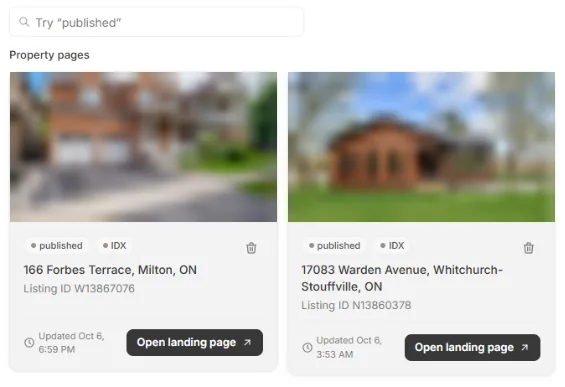
Property pages. Listing photos are blurred.
Say it to ORBIT
You can also just ask. For example:
- “Make a property page for MLS® W1234567.”
- “Turn the Maple Crescent page into an open-house page for Sunday 2 to 4.”
- “Delete the page for 17 Elm Street.”
Tips
- A page never invents facts or photos: everything on it comes from the listing.
Questions
Can people book a viewing from a property page?
Yes. Every property page shows your open times from your calendar. A visitor picks a time and leaves their details, and the request reaches your CRM with the listing named. With no open times, the page shows your phone and contact button instead.
Does a property page appear on my website?
No. Each page stands alone with its own link; it does not add the listing to your website.
Can I edit the page myself?
Ask ORBIT. It changes the design, the order of the sections and the wording, and keeps every fact true to the listing.
What if the listing is not in the MLS® data?
ORBIT can use the public listing page, or a link you give it.
Something not covered here? Ask ORBIT, or write to [email protected]. All guides