 ORBIT, your AI partner
Your AI team (AI Employees)
Hire AI Employees in plain words, talk to them like colleagues, give them routines, and see their work in Feeds.
What you will do
Hire an AI Employee for one job and give it its first task in under two minutes.
Steps
Open your team
Press Team in the sidebar. You see your AI Employees and groups, each with its last message.
Hire an AI Employee
Press +, then New employee. Pick a look and a colour, then write a Name, a Job title and What they do in plain words, for example *Follows up with every new website lead the same day, and books a first call with me.*
Press Create employee. The Employee introduces itself in its own chat.
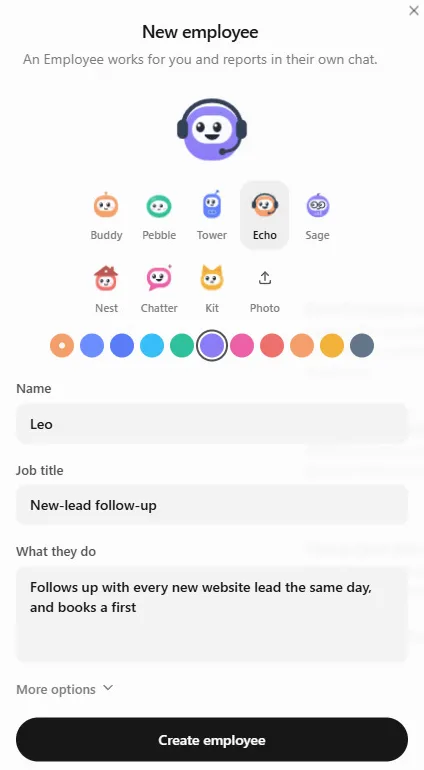
Hiring takes a name, a job title and one sentence. Give it a job
Write to the Employee like a colleague, for example *Get me ready for my call with Olivia on Friday: what should I ask, and which townhouse should I lead with?* It works on its own and answers in the chat.
Make it automatic with a routine
In the Employee's panel press New routine. Name it, choose when it runs (for example Every weekday at 9:00 AM) and write What to do. Press Create routine.
Work as a group
Press +, then New group, and put several Employees in one chat so they work on something together.
Tips
- Give each Employee one clear job. ORBIT hands work to the right one and keeps the whole picture.
- What an Employee does shows up in Feeds, credited to it.
Questions
Can an AI Employee message my clients on its own?
Only within your operating mode. In Approval mode, the default, anything an Employee wants to send waits for your OK in the Action Center.
How many AI Employees can I have?
It depends on your plan: Pro includes three and Ultra five. Solo does not include AI Employees.
Do AI Employees use my AI usage?
Yes. Their work counts toward your plan's monthly AI usage, the same as ORBIT's.
Something not covered here? Ask ORBIT, or write to [email protected]. All guides