 ORBIT, your AI partner
Feeds
Everything ORBIT and your AI Employees did, one post per client, and how a comment tells ORBIT what to do next.
What you will do
See what happened with every client at a glance, and steer ORBIT from the post itself.
Steps
Open Feeds
Press Feeds in the sidebar. It is the first page you see after you log in, with the newest posts at the top.
At a glance on the right shows what is waiting for you, your active jobs and what is in progress. Coming up lists the next jobs.
Read a client's post
Each client has one post. ORBIT writes what it did in the first person, for example *I saved three Oakville townhouses on Olivia's record and set a reminder to call her Friday at 10:00 AM.*
Work done by an AI Employee carries the Employee's name, so you always know who did it.
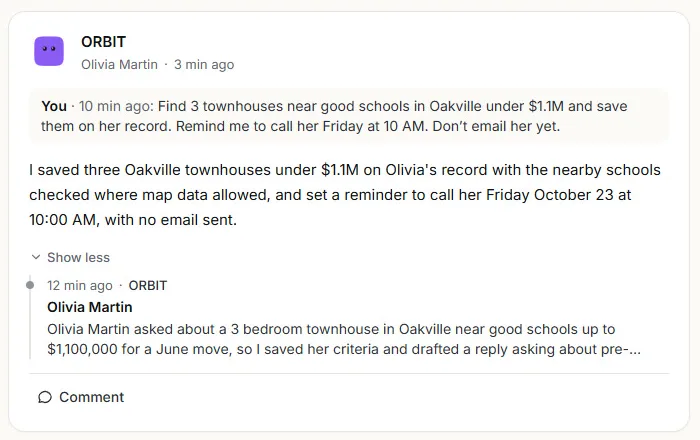
One post per client, with the whole story inside. See the whole story
Show more opens the client's timeline: the form, the call, the reply and every step after it. Show less folds it again.
Tell ORBIT what to do next
Press Comment on a post, write what you want in plain words, for example *Find 3 townhouses near good schools under $1.1M and save them on her record. Don't email her yet.*, and press Send.
ORBIT acts on the comment for that client and reports the result in the same post. In Approval mode, anything that would go out to the client still waits for your OK in the Action Center.
Check your jobs
The Jobs tab lists your scheduled jobs and their latest results. A comment on a job's result works the same way: ORBIT, or the Employee who runs the job, acts on it.
Tips
- Make Feeds your morning check: read the top posts, and comment where you want something changed.
- A comment is an instruction for that client only.
Questions
What is the difference between Feeds and the Action Center?
Feeds shows everything that happened. The Action Center keeps only what waits for your decision, such as a reply or a call ORBIT prepared.
Can I change something ORBIT did from a comment?
Yes. Write another comment on the same post, for example *Move the reminder to Monday*, and ORBIT changes it.
Something not covered here? Ask ORBIT, or write to [email protected]. All guides