 ORBIT, your AI partner
Move deals through your pipeline
The real-estate stages, how to move a deal, close it as won or lost, track your commission and change the stages.
What you will do
Keep every deal in the right stage, close it properly and know what commission is still to collect.
Steps
The stages
Deals move through New → Showing → Offer Made → Negotiating → Under Contract, then Closed Won or Lost. On Hold parks a deal you will come back to.
Move a deal
On the Deals board, drag the card to the next column, or open the deal and change its status. Or tell ORBIT: “Move the Patels to Offer Made.”
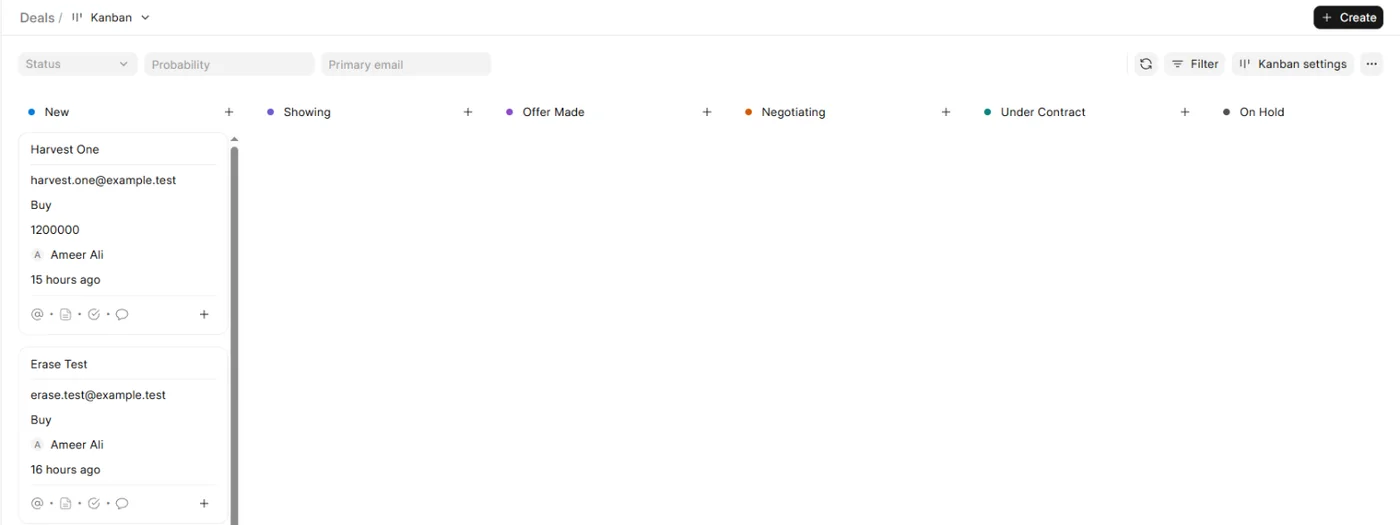
The Deals board. Close a deal as won
Move the deal to Closed Won. Add the Actual Sale Price and the Commission Rate, and the Commission Amount is worked out for you (price × rate). The closing date is recorded when the deal is won.
Close a deal as lost
Move it to Lost and choose a reason: Bought with another agent, Not ready, Unresponsive, Budget mismatch, Changed plans or Other. Other needs a short note.
Track your commissions
CRM → Commissions lists every won deal and Pending commissions the ones not paid yet. Set each deal's Commission Status to Pending, Invoiced or Paid. Your dashboard shows Commissions earned and Commission to collect.
Reopen a deal
Move a closed deal back to an open stage, or ask ORBIT to reopen it. Reopening a won deal clears its sale price and any unpaid commission, and keeps the old price in a Deal reopened note. A paid commission stays.
Change the stages
Agent tools & settings → CRM → Pipeline stages lets you rename, recolour, reorder and add stages. A stage can be deleted only when it is empty, and deals always keep an open stage, a won stage and a lost stage.
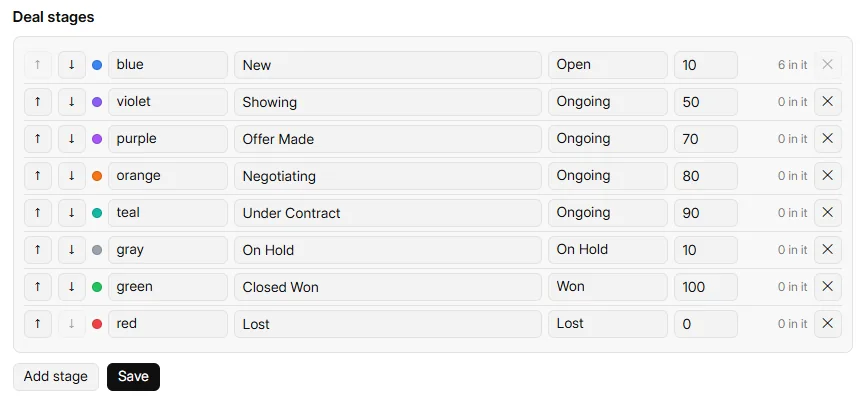
Agent tools & settings → CRM → Pipeline stages.
Say it to ORBIT
You can also just ask. For example:
- “Move the Patels to Under Contract.”
- “Close Omar Haddad's sale as won at $1,120,000 with a 2.5% commission.”
- “How much commission is still to collect this year?”
Tips
- Leads have their own stages. A lead becomes a deal when you convert it. See Leads and clients.
- Groups never change a deal's stage.
Questions
Is the commission rate limited?
When ORBIT sets it, the rate is between 0 and 10 percent.
Can a commission be marked cancelled?
No. Your CRM tracks a commission as Pending, Invoiced or Paid.
Does a won deal need a sale price?
No, but without a price no commission is recorded yet. Add the price when you have it.
Something not covered here? Ask ORBIT, or write to [email protected]. All guides