 ORBIT, your AI partner
Delete your account and data
Delete your Tanero account yourself or ask us by email, and know exactly what is removed and when.
What you will do
Remove your account and data for good, or help someone whose details are in your CRM.
Steps
Delete your account yourself
Open Agent tools & settings → Account → Permanently delete account. Type DELETE, enter your Current password, tick I understand that this permanently removes the account and its owned resources., then press Permanently delete account.
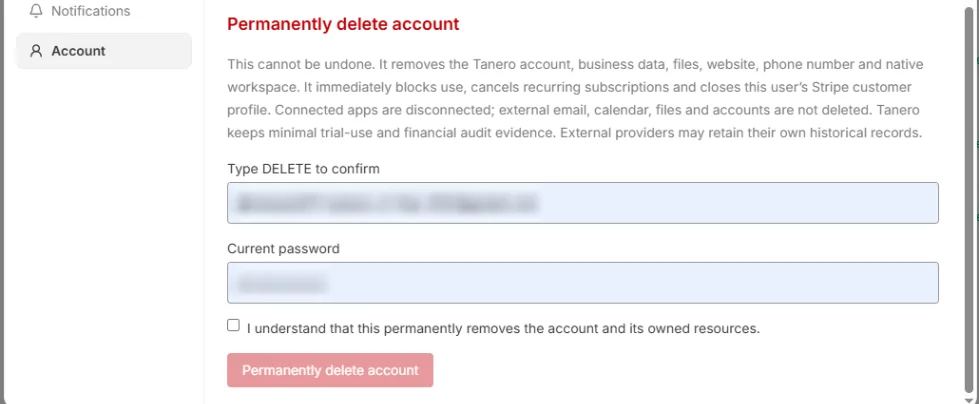
Agent tools & settings → Account → Permanently delete account. Field values are blurred. What happens
Use of the account stops at once. Tanero removes your account, business data, files, website, phone number and workspace, cancels your subscription and disconnects your apps. You are signed out and see Account deletion in progress, then Account deleted.
What is not deleted
Your own email, calendar and file accounts, such as Gmail, Outlook or Google Drive, are not deleted. Tanero keeps only the minimal billing and financial records the law requires.
Ask by email instead
Email [email protected] with the subject Data deletion request from your account's email address. We delete your data within 30 days of a verified request, remove backup copies within 90 days, and email you when it is done.
If your details are in a realtor's CRM
Anyone whose details a Tanero realtor keeps can ask the same way. Include your name and the phone number and email the realtor may have. See Data deletion instructions.
Delete one client
To erase one person rather than your whole account, see Merge duplicates and delete a client.
Tips
- Download the documents you want to keep before you delete your account.
Questions
Can I undo an account deletion?
No. Deleting your account is permanent.
It says the current password could not be verified.
The password was wrong, so nothing was deleted. Type your current password and try again.
Something not covered here? Ask ORBIT, or write to [email protected]. All guides